Acoustic simulator with IR and FX

Works with acoustic and electric guitar

Produkto kodas: J293J

192.03

12
  • Atsiėmimas parduotuvėje

Užsukite į Muzikos parduotuvėje Šiauliuose ir atsiimkite savo užsakymą

Nemokamas

  • Atsiėmimas paštomate

Pasirinkite sau patogiausią paštomatą

1-10 d.d.

Nuo 2.60€

  • Pristatymas kurjeriu

Kurjeris prekes atveš į Jūsų nurodytą adresą

1-10 d.d.

Nuo 6.20€

  • 14 dienų prekių grąžinimas
  • Pardavėjas neatsako už tai, kad El. parduotuvėje esančios prekės savo spalva, forma ar kitais parametrais gali neatitikti realaus prekių dydžio, formų ir spalvos dėl Pirkėjo naudojamo vaizduoklio ypatybių.

Mokėjimo metodai

Mokėjimo budai

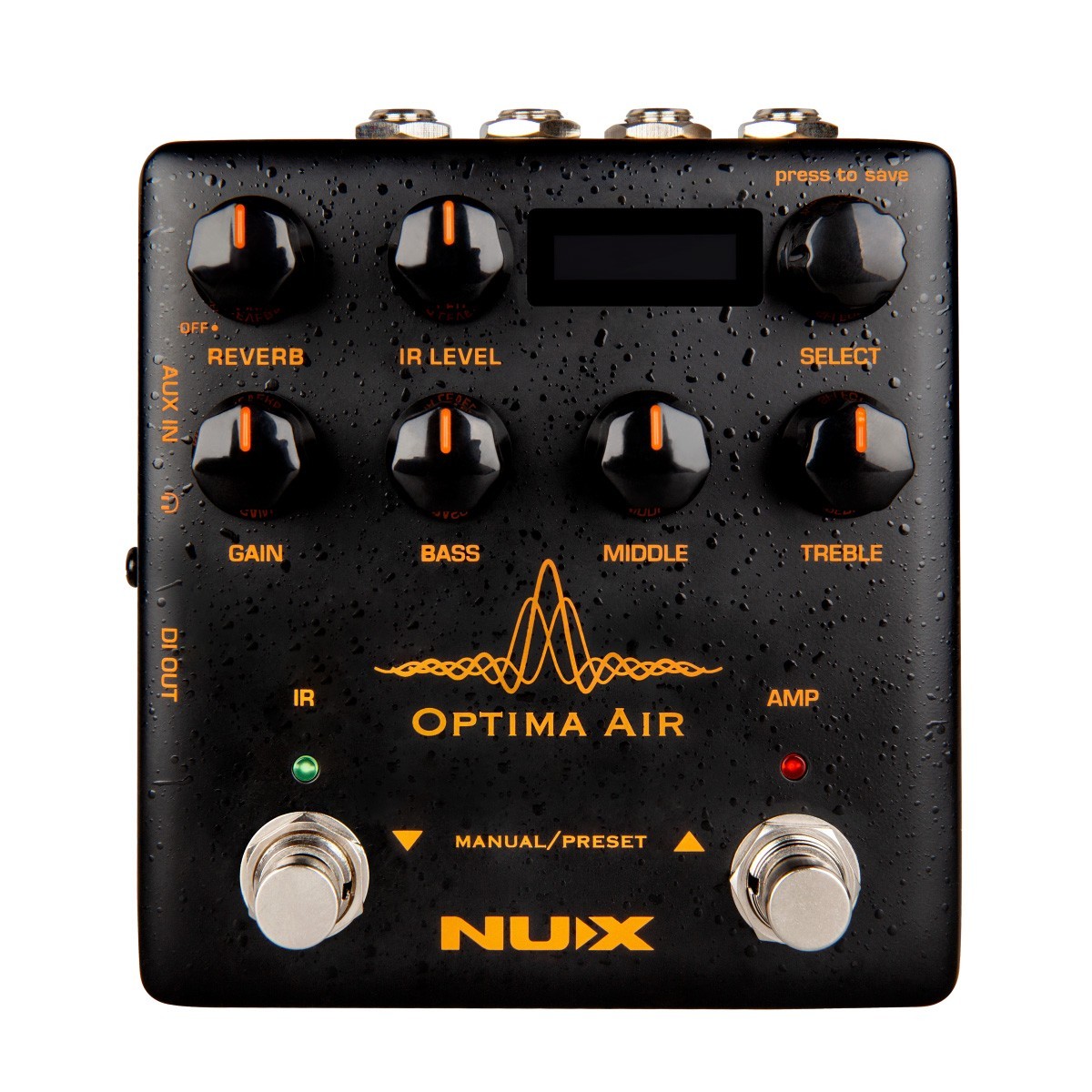
NUX Optima Air is a dual-switch acoustic guitar simulator with a preamp for acoustic and electric guitar players. It simulates the acoustic guitar profiles with the best-optimized sound depending on your guitar and pickup type.IR loader combined with a preamp which is equipped with 3-band EQ and Gain controls. And there is an additional one-knob-control Reverb effect. If you want to connect any effect pedal you can use the SEND/RETURN effect loop and add the Optima Air into the signal chain. NUX Optima Air has a unique profile capture function, you can create your own acoustic guitar profile (IR file) by capturing your favorite acoustic guitar’s sound. There is an XLR DI output for direct line/mixer connection, headphones output for silent play and auxiliary input to connect a music player to play along.

Simulates the acoustic guitar profiles with the best-optimized sound depending on your guitar and pickup type

IR loader with 15 cabinets + 3rd parties IR

Create your own acoustic guitar profile (IR file) by capturing your favorite acoustic guitar’s sound

Preamp with 3 band Eq and Gain control

Built in Reverb

Phones, Aux in, FX loop, DI out

Editor software for IRs

  • 24 bit, 48-kHz sampling quality

9 presets slots

6.35mm send/return connections

6.35mm send/return headphone out

XLR DI out

Micro B USB port


http://images.myfrenex.com/dataweb/J293J/Allegati/MANUALI/NUX NAI-5 Optima Air User Manual.pdf

http://images.myfrenex.com/dataweb/J293J/Allegati/MANUALI/NUX Optima Air Firmware Update Guide.pdf


0
0
0
0
0

Atsiliepimai

Išvalyti filtrus

Atsiliepimų dar nėra.

Rašyti atsiliepimą gali tik prisijungę pirkėjai, kurie yra įsigiję šį produktą.

0
0
0
0
0

Atsiliepimai

Išvalyti filtrus

Atsiliepimų dar nėra.

Rašyti atsiliepimą gali tik prisijungę pirkėjai, kurie yra įsigiję šį produktą.

Nuolaidos iki 40%

Pasiruoškime šventėms kartu!

0 dienos 00 hr 00 min 00 sc

NUX Optima Air is a dual-switch acoustic guitar simulator with a preamp for acoustic and electric guitar players. It simulates the acoustic guitar profiles with the best-optimized sound depending on your guitar and pickup type.IR loader combined with a preamp which is equipped with 3-band EQ and Gain controls. And there is an additional one-knob-control Reverb effect. If you want to connect any effect pedal you can use the SEND/RETURN effect loop and add the Optima Air into the signal chain. NUX Optima Air has a unique profile capture function, you can create your own acoustic guitar profile (IR file) by capturing your favorite acoustic guitar’s sound. There is an XLR DI output for direct line/mixer connection, headphones output for silent play and auxiliary input to connect a music player to play along.

Simulates the acoustic guitar profiles with the best-optimized sound depending on your guitar and pickup type

IR loader with 15 cabinets + 3rd parties IR

Create your own acoustic guitar profile (IR file) by capturing your favorite acoustic guitar’s sound

Preamp with 3 band Eq and Gain control

Built in Reverb

Phones, Aux in, FX loop, DI out

Editor software for IRs

  • 24 bit, 48-kHz sampling quality

9 presets slots

6.35mm send/return connections

6.35mm send/return headphone out

XLR DI out

Micro B USB port


http://images.myfrenex.com/dataweb/J293J/Allegati/MANUALI/NUX NAI-5 Optima Air User Manual.pdf
http://images.myfrenex.com/dataweb/J293J/Allegati/MANUALI/NUX Optima Air Firmware Update Guide.pdf